Payment retries & idempotency patterns
# Payment Retries in High-Volume Magento 2 / Adobe Commerce Stores
In high-volume Magento 2 / Adobe Commerce stores, payment retries are one of the most common causes of double charges, duplicate orders, orphaned quotes, and inconsistent order states. Modern PSPs (Adyen, Stripe, Braintree, Checkout.com, PayPal) provide strong idempotency guarantees — but only when implemented correctly inside Magento’s order placement flow.
This guide outlines the engineering patterns required to make payment retries safe, eliminate double charges, synchronize PSP callbacks, and ensure Magento orders are created exactly once, even under multi-click, partial failures, or network timeouts.
---
## 1. Why Payment Retries Are a Critical Problem
Customers trigger retries when:
- The checkout page hangs
- PSP challenge takes too long
- Network drops during redirect
- 3DS fails or loops
- They click “Place Order” multiple times
- Browser auto-resends the request
- Webhook arrives late
Symptoms inside Magento:
- Duplicate orders
- Orders created without payments
- Payments captured without orders
- “Payment transaction already exists” errors
- Orphaned quotes
- Mismatched PSP reconciliation logs
Without proper idempotency, retry attempts corrupt the platform.
---
## 2. Understanding Idempotency in Payments
**Idempotency** = same request executed multiple times results in a single unique effect.
**Key benefits:**
- Avoid double charges
- Prevent duplicate transactions
- Ensure consistent order state
- Allow safe retry after failure
- Handle slow webhooks gracefully
PSPs typically use:
- Idempotency keys
- Merchant reference IDs
- Payment intent IDs
- PSP session tokens
Magento must map these correctly.
---
## 3. Magento’s Default Flow Limitations
Magento core has issues:
- “Place Order” can fire multiple times
- JS checkout may re-trigger the same action
- No default idempotency keys
- No order-level deduplication
- PSP webhooks can arrive before/after the user returns
- Partial authorization flows break frontend
Merchants must enforce idempotency **manually** or implement PSP modules that do it.
---
## 4. Essential Idempotency Patterns for PSP Integrations
### 4.1 Frontend-level button lock
Immediately disable “Place Order” button after the first click.
### 4.2 Backend quote-locking
Use database-level flags to lock the quote after initial submission.
### 4.3 PSP idempotency keys
Automatically generate a GUID per attempt:
```
idempotency_key = "MAGENTO-" + quote_id + "-" + timestamp
```
### 4.4 Order-level deduplication
Ensure:
- One transaction = one order
- Multiple retries map to the same PSP payment session
### 4.5 Webhook synchronization
Webhook must not create a second charge.
---
## 5. Pattern: Payment Intent Architecture
PSPs like Stripe/Adyen use a **Payment Intent**:
- Created during checkout
- Updated during retry
- Always linked to the same customer attempt
- Contains all states (`requires_action`, `succeeded`, `failed`)
Magento should:
- Reuse the same intent for all retries
- Never create a new PSP payment on retry
- Link the intent to the quote permanently
---
## 6. Pattern: Webhook-First Ordering
Safer architecture:
1. Customer submits order
2. Magento creates PSP intent
3. Customer completes challenge
4. PSP webhook arrives → authenticates payment
5. Magento creates order **only once**
6. Frontend polls for state
This prevents:
- Double orders
- Payment without order
- Order without payment
---
## 7. Pattern: Database-Level Retry Protection
Use table fields like:
- `retry_token`
- `last_attempt_time`
- `is_payment_pending`
- `is_quote_locked`
Backend workflow:
- First attempt locks the quote
- Subsequent attempts check quote lock
- Only unlock on explicit failure
---
## 8. Pattern: Safe Retry Windows
Allow retries only:
- Within a time window (e.g., 5 minutes)
- With same PSP intent
- With matching idempotency key
Block retries when:
- Order already created
- Intent succeeded
- PSP returned hard decline
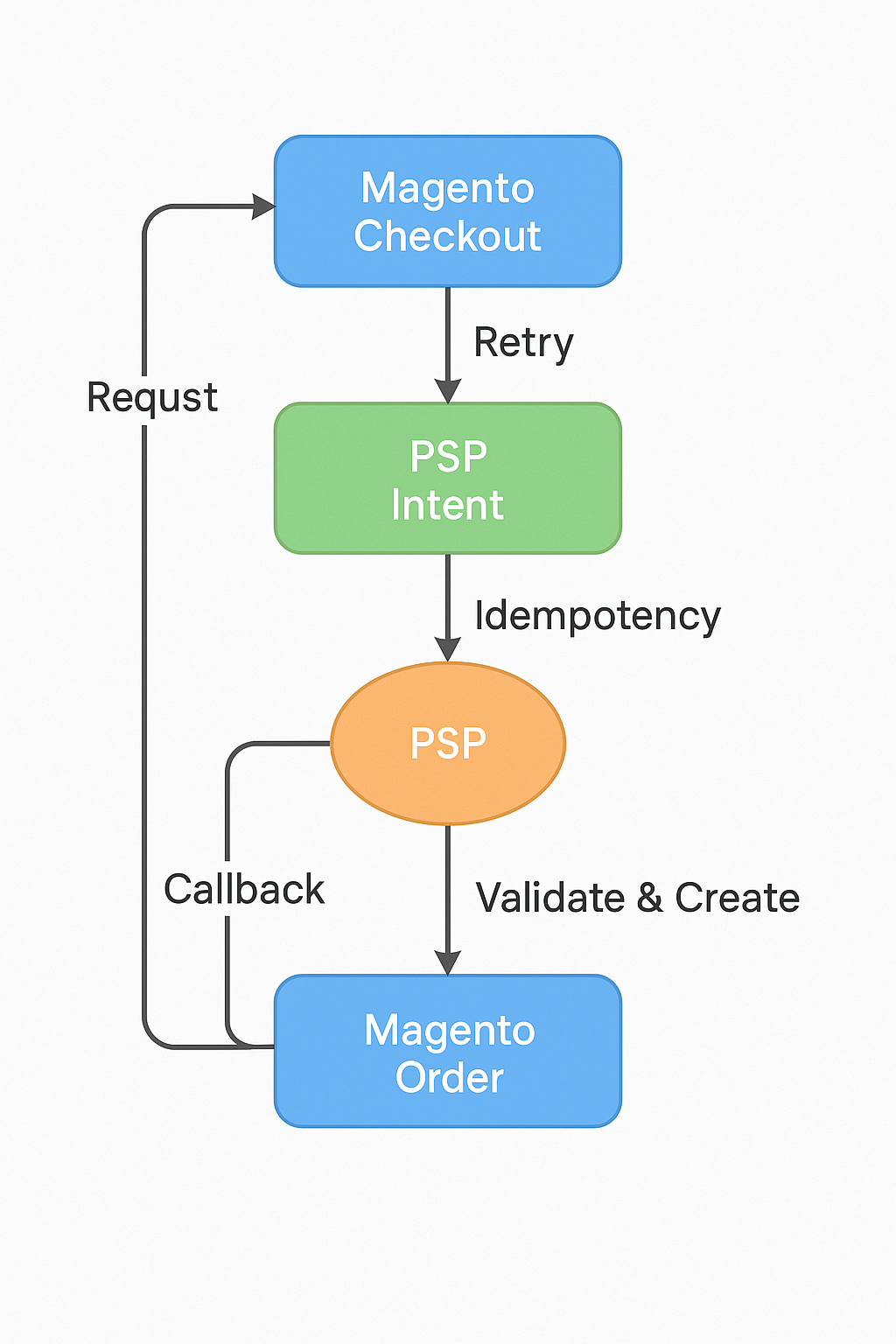
**Description:** A UI/log mock showing how Magento detects and blocks a second payment attempt when the first already succeeded.
---
## 9. Handling Late PSP Webhooks
Late webhooks cause most mismatches. Magento must:
- Store PSP intent status
- Compare webhook status with stored state
- Avoid creating orders twice
- Reconcile status differences
If webhook arrives late after frontend timeout:
- Show “Pending Payment” to customer
- Continue polling
- Create order only once webhook validates
---
## 10. Recovering Orphaned PSP Payments
Sometimes payment succeeds but Magento fails to create order. Recovery path:
- Identify PSP payment without Magento order
- Match transaction ID to quote ID
- Regenerate order programmatically
- Mark order as authorized/captured
This prevents revenue loss.
---
## 11. Queue-Based Retry Architecture
Use Magento’s MQ to:
- Queue all payment creation events
- Ensure FIFO processing
- Deduplicate tasks
- Guarantee order creation is atomic
**Best practice:** producer → queue → consumer → orderCreatorService
---
## 12. Observability & Logging
Log:
- `idempotency_key`
- PSP intent ID
- Webhook delay
- Frontend retry attempts
- Quote lock events
- Duplicate request rejections
Dashboards should show:
- Retry count
- Duplicate block rate
- Webhook latency histogram
- Payment funnel drop-off
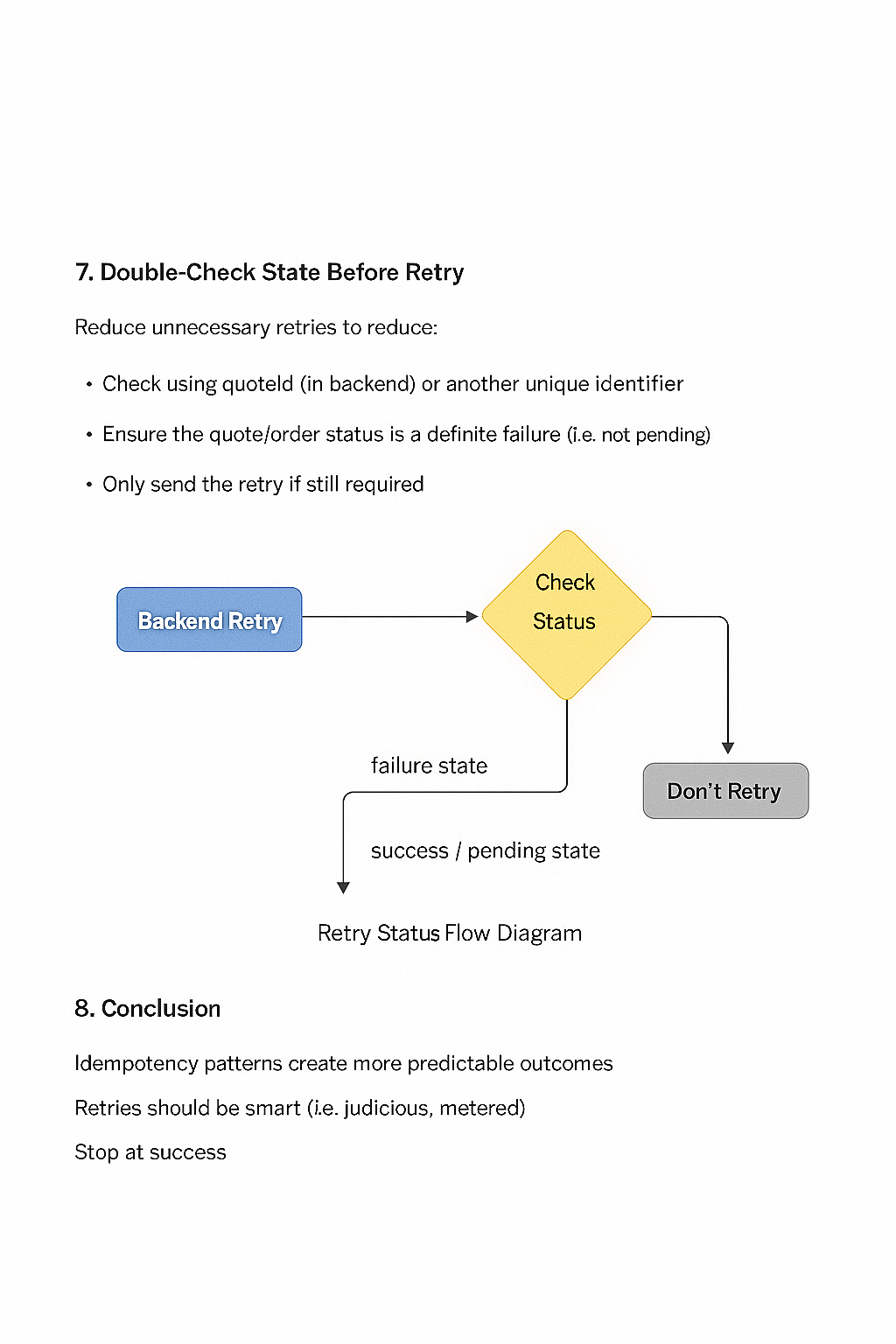
**Description:** Mock dashboard summarizing retry attempts, blocked duplicates, webhook latency, and successful recovery flows.
---
## 13. Production Checklist (2025)
- Frontend click-blocking enabled
- PSP idempotency keys active
- Quote locked after first attempt
- Intent reused across retries
- Webhook-first order creation
- Orphan payment recovery enabled
- All PSP modules tested under failure scenarios
- Monitoring for duplicate attempts added
- Payment dashboard reviewed weekly
Logging strategy: Graylog/ELK with redaction
# High-Scale Centralized Logging for Magento 2 / Adobe Commerce
High-traffic Magento 2 / Adobe Commerce environments generate millions of log lines per day across PHP-FPM, Nginx/Apache, Redis, MySQL, Varnish/Fastly, queue workers, cron jobs, and custom modules. Without a structured logging strategy, identifying regressions, production incidents, fraud patterns, or integration failures becomes impossible.
Graylog and ELK (Elasticsearch + Logstash + Kibana) are the two most common centralized logging stacks for Adobe Commerce. This guide explains how to architect a high-scale logging pipeline with data masking/redaction, PCI-safe storage, and performance-neutral log forwarding.
## 1. Why Magento Needs Centralized Logging
At scale, merchants face:
- Mixed logs across multiple application nodes
- Hard-to-track multi-node PHP-FPM crashes
- Missing context from queue workers
- Performance regressions hidden due to local logs
- High risk of leaking PII or PCI-sensitive fields
- Difficulty correlating logs with Fastly ↔ Magento ↔ PSP flows
Centralized logging solves:
- Rapid root-cause analysis
- Pattern detection
- Anomaly alerts
- Replay of user journeys
- Auditing and compliance
However, logs must be **heavily redacted** before storage.
## 2. Magento's Default Logging Pain Points
Magento logs contain:
- Email addresses
- Full names
- Addresses
- Order numbers
- Admin actions
- API payloads
- Cart details
- Payment gateway callbacks
Some modules even log:
- Raw credit card fields (legacy modules)
- Session cookies
- Tokens
- Authorization headers
These **must never** reach centralized logging.
## 3. Graylog vs ELK — Choosing the Right Stack
### Graylog
- Built-in pipeline processors
- Real-time stream routing
- Strong PII redaction tools
- Lower operational overhead
- Great alerting UI
### ELK
- Highest flexibility
- Native integration with OpenSearch clusters
- Large ecosystem of plugins
- Can scale to tens of millions of log lines/day
**Recommendation:**
- For Adobe Commerce Cloud or Kubernetes deployments → **Graylog**
- For self-hosted enterprise clusters or multi-region → **ELK/OpenSearch**
## 4. Architecture Overview for Logging Pipelines
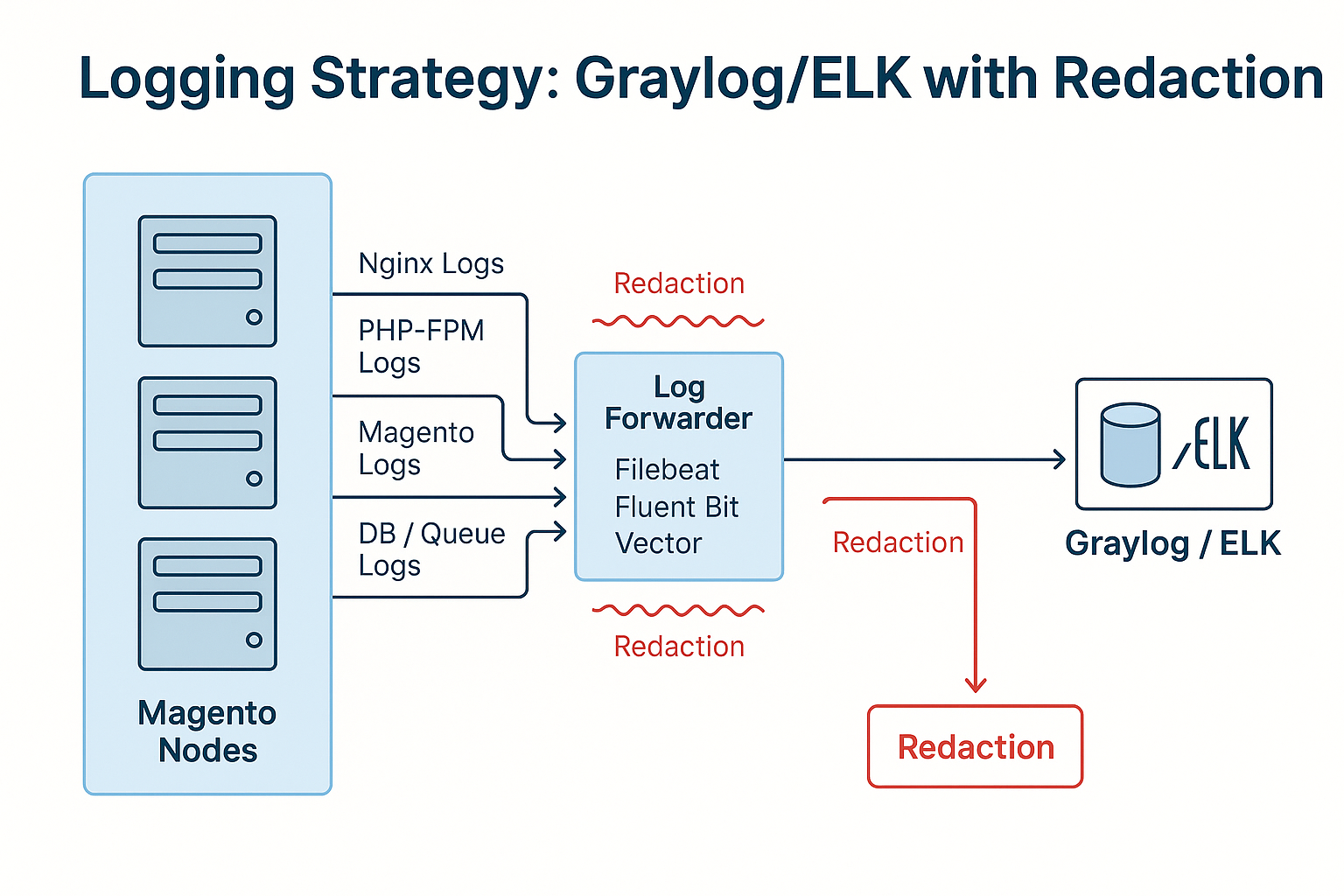
### Logging sources:
- Nginx/Apache access logs
- PHP-FPM logs
- Magento logs (`system.log`, `exception.log`, custom logs)
- CRON/Consumer logs
- MySQL slow query log
- Redis slowlog
- Fastly VCL logs
- Adobe Commerce Observability logs
### Forwarders:
- Filebeat
- FluentBit
- Graylog Sidecar
- Vector
### Targets:
- Graylog inputs
- Logstash → Elasticsearch/OpenSearch
- S3 cold storage
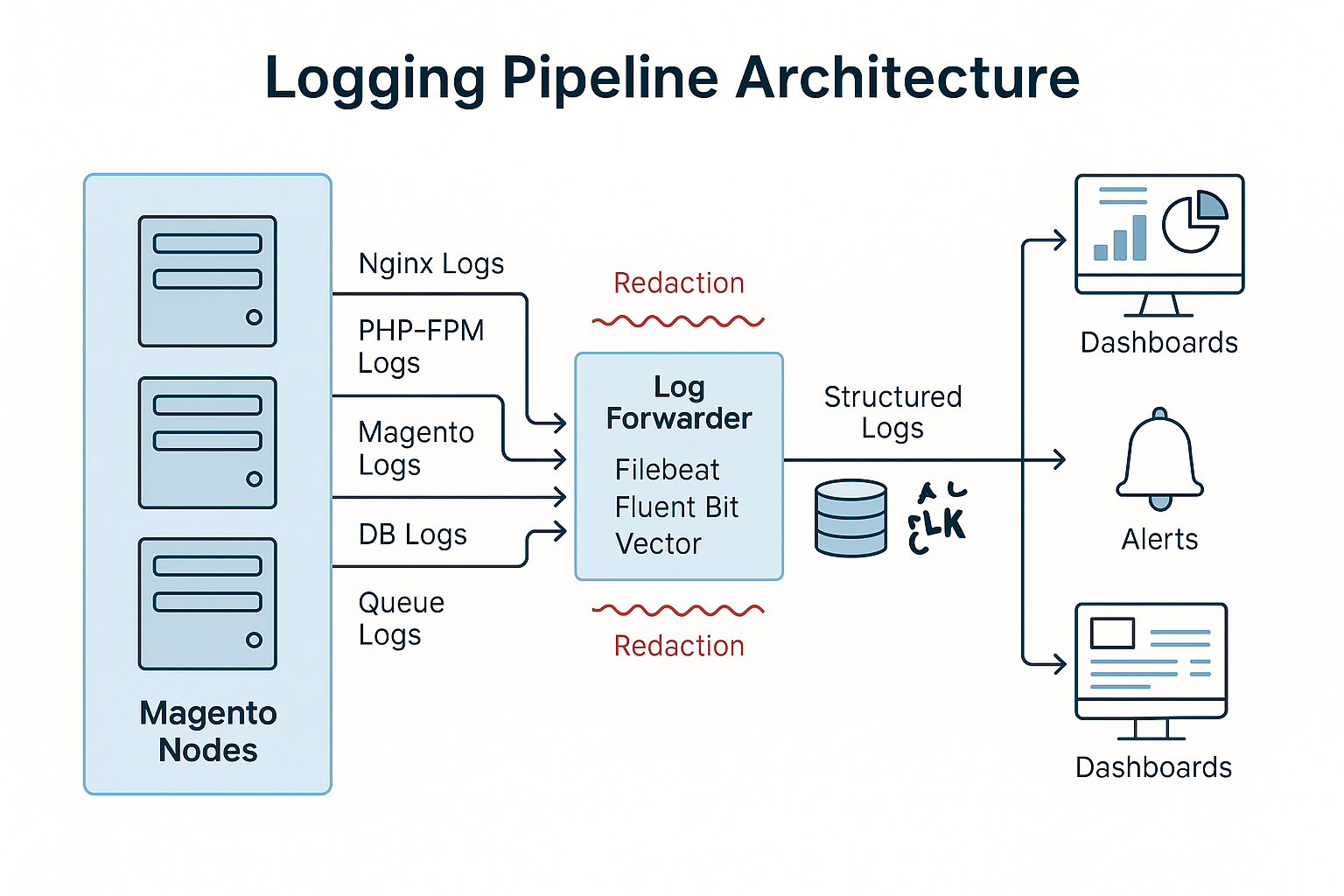
*Description: Diagram showing Magento nodes → log forwarders → Graylog/ELK → storage → dashboards/alerts. Redaction highlighted at the forwarder layer.*
## 5. Log Redaction Strategy (Critical for PCI/GDPR)
### Fields to always redact:
- Card numbers
- CVV
- PAN tokens
- Billing names
- Shipping addresses
- Emails
- Session IDs
- Authorization headers
- JWT tokens
- API keys
- Customer notes
- Search terms (optional)
Redaction must occur **before logs leave the application node**.
## 6. Redaction inside Magento
Place custom log processors inside:
- `MagentoFrameworkLoggerMonolog`
- Custom Monolog handlers
- Before `system.log` and `exception.log` writes
**Example:**
- Replace email with `[redacted-email]`
- Mask digits in card-like number patterns
- Remove tokens from URLs
**Regex patterns should match:**
```regex
/[0-9]{12,19}/g
/[A-Za-z0-9-_]{20,}./g (JWT)
/\"email\"s*:s*\"(.*?)\"/
/Authorization:s+Bearers+[A-Za-z0-9._-]+/
```
## 7. Redaction at Forwarder Layer (Best Practice)
Use Filebeat/FluentBit processors for:
- Key/value filtering
- Regex scrub
- Field removal
- JSON masking
This allows centralized and uniform masking across log types.
## 8. Logging Levels & Volume Control
**Recommended production logging levels:**
- **PHP:** WARN
- **Magento:** ERROR (most merchants have this too verbose at INFO)
- **Nginx:** WARN
- **MySQL:** slow query logging enabled for >200 ms
- **Redis:** slowlog enabled, but keep length 2%
Tie alerts to:
- Slack
- PagerDuty
- Email
- OpsGenie
## 11. Dashboarding & Visualisations
**Recommended dashboards:**
- Exception rate over time
- Search query errors
- Queue consumer activity
- API latency (GraphQL/REST)
- Database execution time breakdown
- Redis hit/miss ratio
- Payment failure trends
- Admin activity stream
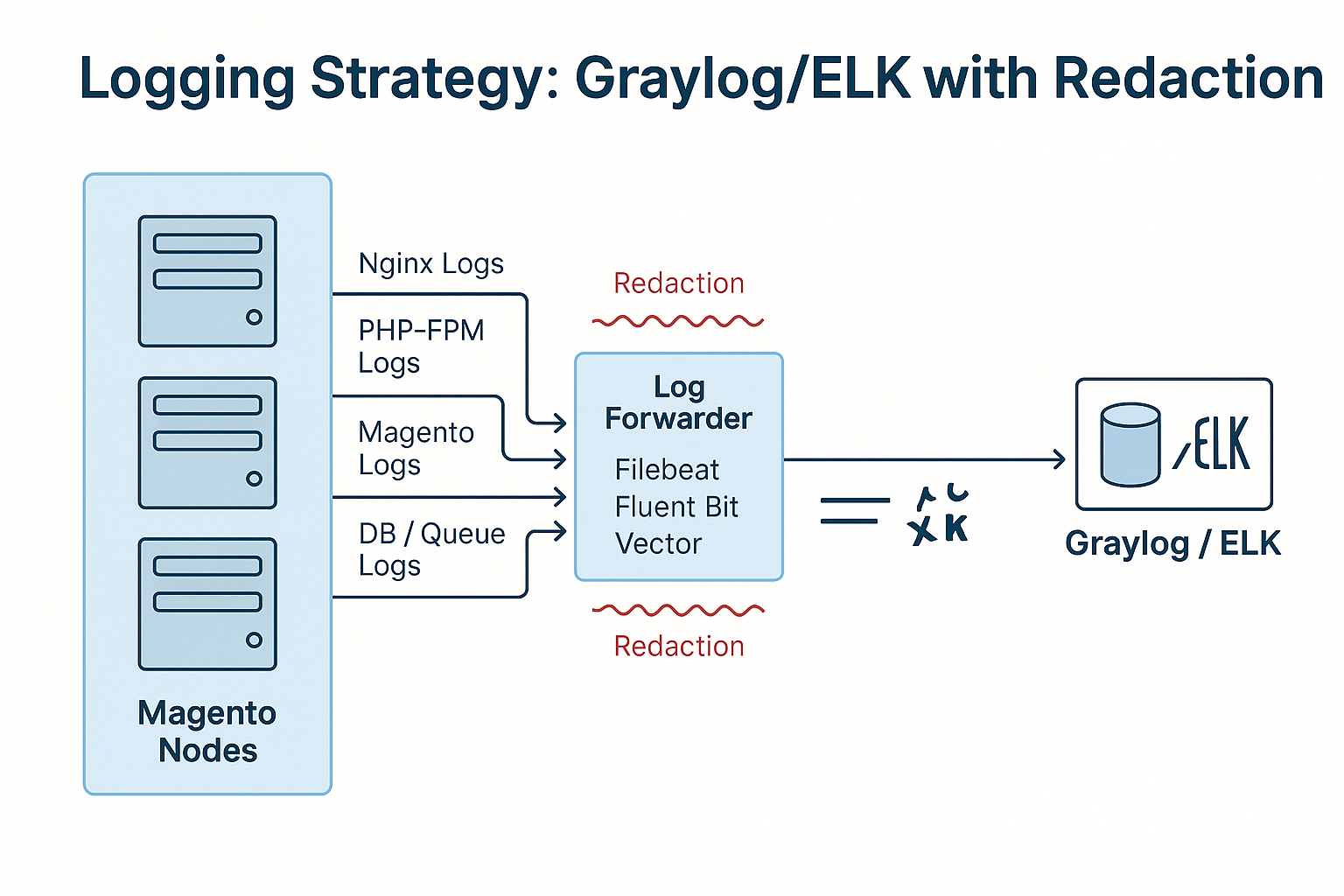
*Description: A screenshot showing log entries before/after redaction: email masked, tokens removed, digits replaced with asterisks.*
## 12. Indexing Retention & Cost Optimization
- Keep high-volume logs only 7–14 days
- Move warm logs to OpenSearch warm nodes
- Archive to S3/Glacier monthly
- Disable indexing of non-queryable fields
- Avoid storing full request bodies
**For fast search, keep only:**
- Error class
- URL
- Correlation ID
- Timestamp
- Device type
*Description: Mock screenshot of Graylog or Kibana dashboard displaying error rates, top exceptions, node health, and redaction confirmation indicators.*
## 13. Production Checklist (2025)
- [ ] Redaction at node-level forwarders
- [ ] Minimal Magento logging at INFO
- [ ] PCI fields masked everywhere
- [ ] Queries with slow logs enabled
- [ ] All Magento nodes forwarding to centralized system
- [ ] Graylog/ELK cluster monitored and replicated
- [ ] Dashboards maintained & reviewed monthly
- [ ] No tokens/headers visible in logs
- [ ] S3 archival enabled
ContentSquare + Magento: implementing without performance loss
# ContentSquare Performance Optimization for Magento 2 / Adobe Commerce
ContentSquare provides powerful UX analytics and session replay capabilities, but when implemented incorrectly on Magento 2 / Adobe Commerce, it can introduce performance overhead — especially on LCP, INP, and CLS.
This guide outlines how to integrate ContentSquare in a high-traffic Magento environment without degrading storefront performance or adding unnecessary JavaScript weight. Large enterprises using Adobe Commerce Cloud, Fastly, Edge-Side Includes (ESI), GraphQL storefronts, or custom PWA frontends can implement ContentSquare safely using optimized loading strategies, sampling, and advanced gating.
## 1. Why ContentSquare Causes Performance Issues By Default
ContentSquare inserts:
- A heavy JavaScript loader
- Asynchronous replay scripts
- DOM mutation tracking
- Mouse/scroll/click listeners
- Network beacons
- Optional heatmap overlays
- Session recording logic
If loaded early in `<head>`, it negatively affects:
- **LCP** (Largest Contentful Paint)
- **INP** (Interaction to Next Paint)
- **TTFB** (if blocked through tag manager paths)
- **CLS** (due to injection in dynamic layouts)
A poorly configured implementation increases JS execution time by **40–150 ms** on average storefronts — higher on mobile Safari.
## 2. Recommended Integration Model for Adobe Commerce
Adobe Commerce architecture considerations:
- **Use asynchronous loader provided by CS**
- **Do NOT place JS in `<head>`**
- **Load via Tag Manager with priority control**
- **Gate through cookie consent if applicable**
- **Respect PCI & checkout-sensitive pages**
- **Ensure replay scripts load after critical rendering**
- **Enable sampling on category + product pages**
The ideal injection point is **post-LCP**, using deferred execution.
## 3. Fastly & CDN Considerations
On Adobe Commerce Cloud:
- ContentSquare script should be cached at the **edge** (Fastly).
- Do not inject script server-side; use client-side async injection.
- Ensure Fastly does not strip ContentSquare cookies (they affect sampling & session continuity).
- Avoid ESI blocks for ContentSquare — causes reflow and CLS shifts.
**Fastly VCL should be inspected for:**
- `remove resp.headers.Cookie`
- `normalize_url` rules
- `remove querystring` parameters
Misconfigurations break session replay.
## 4. PCI Compliance for Checkout Pages
ContentSquare must **not** record:
- Card details
- Payment iframe contents
- Address forms (unless masked)
- Checkout-specific PII
**Best practice:**
- Disable ContentSquare entirely on `/checkout/*` and `/customer/*`
- Or enforce **strict masking** via ContentSquare privacy settings
Merchants using Adyen/PayPal/Braintree **must disable recording inside iframes**.
## 5. Script Loading Strategy (Critical)
**Correct loading strategy:**
**Avoid:**
- Inline scripts
- Synchronous injection
- Placing in `<head>` before main CSS
- Placing inside Magento layout XML blocks like `before_body_end` if not async
**Preferred load timing:**
- After main render
- After core Magento JS bundles
- After GZip/CSS loads, ideally **500–900 ms post-render**
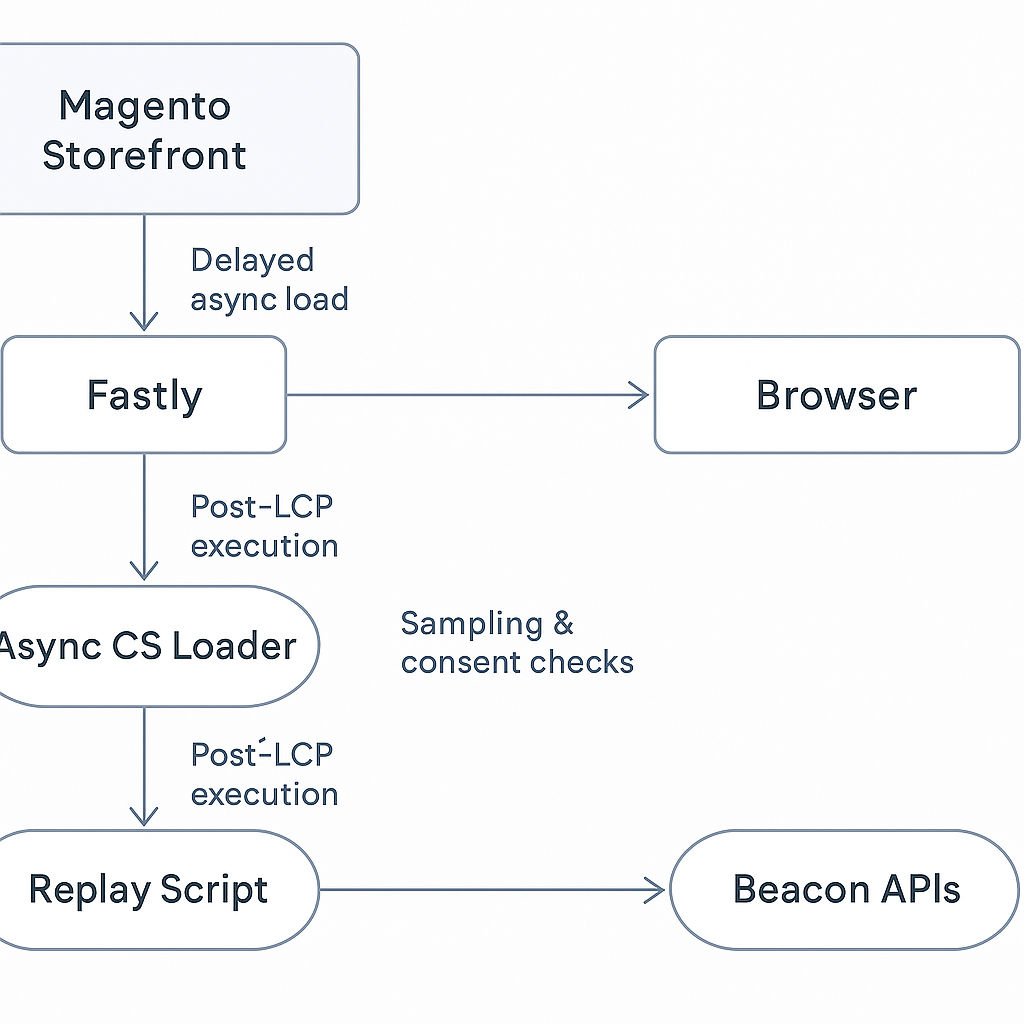
*Description: A diagram showing Magento storefront → Fastly → Browser → Async CS Loader → Replay Script → Beacon APIs. Highlights safe loading sequence after LCP.*
## 6. Sampling Strategy: The Most Important Setting
For large sites (1M+ sessions/day):
**Recommended sampling:**
- **5%** for PLP
- **10%** for PDP
- **0%** for checkout
- **1–2%** for CMS pages
- **0.1–0.5%** for high-traffic landing pages
Higher sampling = heavy JS execution, network beacons, replay storage.
## 7. Impact on INP (Interaction to Next Paint)
ContentSquare increases event listener count:
- Scroll
- Click
- Mousemove
- Touch events
**To avoid INP regressions:**
- Enable throttled replay mode
- Disable replay on complex React/PWA pages
- Use lightweight capture mode
- Ensure Magento custom JS modules do not conflict with mutation observers
## 8. GraphQL + PWA + Headless Storefront Considerations
For headless builds:
- ContentSquare should be added at the **framework level**, not via Magento layout XML
- For React/Vue/NextJS, load inside `_document.js` or equivalent
- Disable component-level hydration tracking during session replay
- Avoid tracking synthetic events triggered by PWA routers
**Do not replay entire virtual DOM trees — only user-interactive elements.**
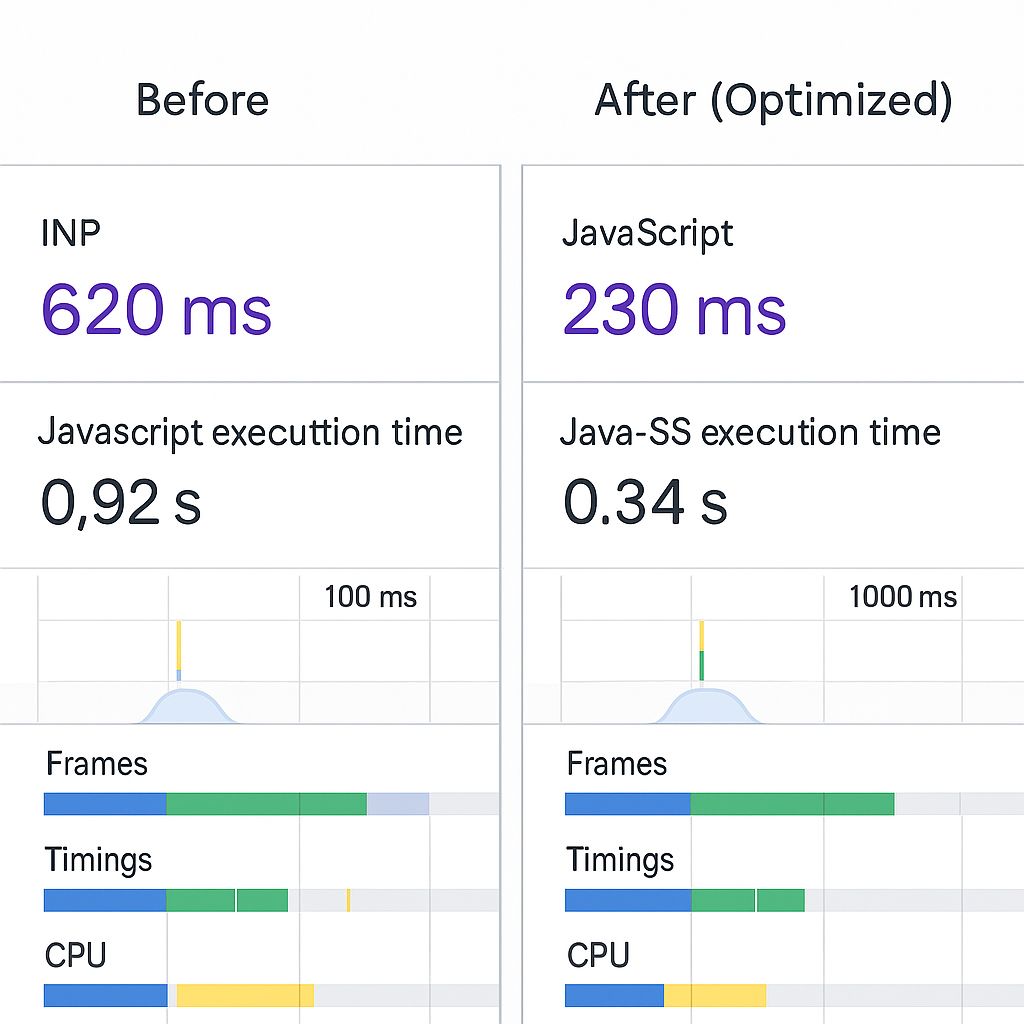
*Description: A screenshot-style mock showing a before/after comparison of INP and JS execution metrics once CS script is enabled vs optimized.*
## 9. Safe Mode & Privacy Configurations
Enable ContentSquare’s **Safe Mode** for:
- EU GDPR
- UK ICO
- California CCPA
- Brazil LGPD
**Features:**
- Masking of all form fields
- Hashing of cookies
- No replay on restricted pages
- IP obfuscation
- Gone when cookie consent not accepted
Magento must integrate ContentSquare with Consent Management Platform (CMP).
## 10. Avoiding Layout Shifts (CLS)
Injecting ContentSquare too early modifies:
- `<body>` size
- Dynamic wrappers
- CSS injected nodes
**To avoid CLS:**
- Inject only after `DOMContentLoaded`
- Do not overlay dynamic heatmap scripts in live mode
- Avoid adding ContentSquare into Magento’s containerized layout XML
## 11. Monitoring Performance Impact After Implementation
**Measure:**
- LCP median (desktop + mobile)
- INP at 75th percentile
- CPU long tasks in Chrome DevTools
- First Input Delay (FID) for older browsers
- Network cost of ContentSquare beacons
**Recommended tools:**
- New Relic Browser
- Web Vitals from Chrome
- Performance tab recordings
- Lighthouse CI
- Adobe Commerce Observability Tools
*Description: A performance dashboard mock showing LCP, INP, JS execution time, and beacons per session for a Magento storefront with optimized ContentSquare setup.*
## 12. Production Rollout Checklist (2025)
- [ ] ContentSquare script loaded **async+defer**
- [ ] Sampling enabled for high-traffic pages
- [ ] Disabled on checkout + customer account
- [ ] Fastly does NOT strip CS cookies
- [ ] Safe Mode enabled
- [ ] No layout XML blocking main-thread
- [ ] Replay script loads **after LCP**
- [ ] No PCI-sensitive data captured
- [ ] Continuous monitoring via Lighthouse CI + New Relic
Catalog indexers for large catalogs (500k–1M SKU)
# Scaling Magento 2 Indexing for 500k–1M SKU Catalogs
Running Magento 2 or Adobe Commerce with a 500k–1M SKU catalog fundamentally changes how indexers behave. What works for a 50k-SKU store breaks at scale: indexing becomes slow, flat tables explode in size, reindex schedules clash, and partial indexing becomes essential for predictable performance.
This guide explains how indexers operate internally, the challenges at million-SKU scale, best-practice configurations, database load considerations, and production strategies for search, category, price, stock, and custom indexer pipelines.
## 1. Why Large Catalogs Break Standard Indexing
Merchants with catalog sizes above 500k SKUs see:
- Extremely large flat & replica tables
- Slow product → category assignments
- High I/O usage on `catalog_product_index_*` tables
- Long reindex cycles (sometimes 45–120 minutes)
- Lock contention during partial reindex
- Stale search results when consumer queues fall behind
- Elastic/OpenSearch indexing delays
At this scale, **indexers become a critical part of platform performance**, not an operational detail.
## 2. How Magento Indexers Work Internally
Magento processes indexers using a combination of:
1. **Materialized Index Tables:** Pre-computed data for price, category, stock, etc.
2. **MView (Materialized Views):** Tracks which entity rows changed.
3. **Change Log Tables:** e.g., `catalog_product_price_cl`, `catalog_category_product_cl`.
4. **Batch Processing:** Indexers consume changes in batches (default 1000 rows at a time).
5. **Full vs Partial Reindex:**
- Full reindex rebuilds entire index (expensive at scale).
- Partial reindex only updates changed rows.
6. **Search Engine Indexing Layer:** ElasticSearch/OpenSearch synchronizes with the catalog indexers.
At 500k–1M SKUs, **full reindex operations must be avoided** during peak traffic.
## 3. Indexers Most Impacted by Large Catalogs
### 3.1 Price Indexer
Affected by:
- Tier prices
- Website-level pricing
- Customer group pricing
- Currency conversion
- Configurable product structure
Price index tables for 1M SKUs can easily reach **8–25 GB** depending on store count.
### 3.2 Category Product Indexer
Generates:
- Category → product mapping
- Sorting positions
- Visibility filters
Category reindexing is one of the slowest operations at high SKU counts.
### 3.3 Product EAV Indexer
Thousands of attributes × 1M SKUs = heavy flattening.
### 3.4 Catalog Search
OpenSearch/Elastic must index:
- Product documents
- Attributes
- Dynamic keywords/tokens
Large merchants often see 30M–50M total search documents.
## 4. Scaling Strategies for 500k–1M SKU Catalogs
### 4.1 Use ‘Update on Schedule’ Always
“Update on Save” causes immediate full recalculations. Large catalogs should **never** use it.
Scheduled indexers allow:
- Batch updates
- MView consistency
- Low lock contention
### 4.2 Increase MView Batch Size
- Default = 1000
- **Large catalogs: 5000–10000**
This massively reduces indexing cycles.
### 4.3 Shard & Offload Search Indexing
Use:
- Multi-node OpenSearch cluster
- Hot-warm architecture
- Dedicated indexing nodes
### 4.4 Optimize Category Structures
Avoid:
- Single categories with >50k products
- Deep category nesting
- Constant mass product moves
### 4.5 Reduce Attribute Count
Many stores incorrectly have 900–1200 attributes.
**Ideal:** 300–400 max for large catalogs.
### 4.6 Process Queue Consumers in Real Time
For large catalogs, run:
```bash
bin/magento queue:consumers:start indexer_update --max-messages=10000
````
And increase concurrency:
```bash
CONSUMERS_WAIT_FOR_MESSAGES=0
```
## 5\. DB Load & Performance Characteristics
Large indexers stress the following:
### 5.1 Temporary Tables
Magento rebuilds temporary index tables then swaps them in. For 1M SKUs:
- Temp tables can exceed 5–12 GB
- Requires double the storage during rebuild
### 5.2 I/O Bottlenecks
InnoDB buffer pool must be sized for:
- Price index
- Stock index
- Flat tables
**Recommended:**
- Buffer pool \>= 75% of total index table size
- NVMe storage strongly recommended
### 5.3 Lock Contention
Operations that cause locks:
- Bulk product updates
- Attribute changes
- Category reassignments
Always schedule bulk jobs outside indexing windows.
*Description: Flow diagram showing EAV tables → MView change logs → Indexers → Materialized index tables → Search engine indexing. Highlights where bottlenecks occur (price index, category-product index).*
## 6\. When Full Reindex is Unavoidable
Full reindex should only occur when:
- Attribute backend type changes
- Attribute added/removed
- Category-level rule updates
- Price rule refresh required
- Massive product import (50k–200k SKUs)
Even then, run during:
- Low traffic windows
- With consumers stopped
- On optimized DB infrastructure
**Time needed at 1M SKUs:**
- Price indexer: 20–45 mins
- Category indexer: 40–90 mins
- Search index: 25–120 mins depending on cluster size
## 7\. Optimizing Reindex Times at Scale
### 7.1 Parallelize Indexers
Run with:
```bash
bin/magento indexer:reindex catalog_product_price
bin/magento indexer:reindex catalog_category_product
```
Not all indexers can run safely in parallel — follow best-practice grouping.
### 7.2 Avoid Massive Database Writes
Avoid:
- Flat table regeneration
- Reindex during import
- Multi-store mass price changes
### 7.3 Use Async Import Pipelines
Recommended:
- Adobe Commerce B2B shared catalog pipelines
- CSV → MQ → Consumer → Indexers
*Description: A heatmap-style mock showing indexing time impact by indexer type (price, category, stock) across 1M SKUs with DB load indicators.*
## 8\. Search Indexing Considerations at 1M SKUs
### 8.1 Document Size Optimization
Limit:
- Searchable attributes
- HTML content
- Media galleries
Large attributes slow down tokenization.
### 8.2 Node Sizing
Recommended cluster:
- 3 hot nodes
- 2 warm nodes
- 1 dedicated master
- Min 64GB RAM per hot node
### 8.3 Rebalancing & Refresh Intervals
OpenSearch settings:
- `refresh_interval = 30s`
- `index.translog.durability = async`
*Description: Admin/DevOps style screenshot showing multi-node OpenSearch cluster, shard distribution, and index document count crossing 50M+.*
## 9\. Production Readiness Checklist (2025)
- [ ] All indexers set to “Update by Schedule”
- [ ] MView batch size increased
- [ ] Price index tables analyzed weekly
- [ ] Separate DB replicas for reporting
- [ ] Search cluster sized for \>50M documents
- [ ] Avoid categories with \>50k products
- [ ] Avoid frequent mass attribute updates
- [ ] Run full reindex only during planned windows
Multi-store currency rounding & tax edge cases
# Magento 2 Multi-Currency Tax & Rounding Guide (Global Multi-Store 2025)
Magento 2’s multi-store architecture becomes extremely complex when different currencies, tax rules, rounding precision, and discount models operate together.
Large EU/UK/US/AU merchants frequently encounter discrepancies between:
- Product page price vs checkout total
- Quote vs Order vs Invoice totals
- ERP vs PSP authorized amount
- Tax-inclusive vs tax-exclusive computed values
This guide explains Magento's calculation pipeline and the real-world edge cases to solve in production Adobe Commerce environments.
---
## **1️⃣ Why Multi-Currency Rounding Becomes Complex**
Multi-store introduces complexities such as:
- Base currency vs **display currency**
- Different **regional tax rules**
- **Tax-inclusive** (EU/UK) vs **tax-exclusive** (US)
- Currencies with **0 or 3 decimals**
- Promotion + rounding combined effects
- Mismatched PSP rounding
- Headless caching without correct currency context
👉 All these create **sub-cent drift** across computations.
---
## **2️⃣ Magento’s Internal Currency Conversion Pipeline**
Magento recalculates prices multiple times throughout the journey:
1. Catalog base price in base currency
2. Convert to **store display currency** using store rate
3. Apply **regional tax rules**
4. Apply **discounts & cart rules**
5. Apply **store-level rounding configuration**
6. Display totals in cart & checkout
7. **Recalculate** during Quote → Order transition
8. Convert again for order/invoice if configuration demands
⚠️ Totals collectors operate in several passes → values differ between screens.
---
## **3️⃣ Localized Decimal Precision & Currency Rounding Rules**
| Currency | Precision | Notes |
|---------|:--------:|------|
| **JPY** | 0 decimals | No fractional currency allowed |
| **CHF** | 0.05 rounding | Swiss rounding rules vary by PSP |
| **BHD/KWD** | 3 decimals | High precision required |
| **AED** | 2 decimals | Differences in card processors |
| **EUR/GBP/USD** | 2 decimals | Standard retail rounding |
Magento stores internal price values with up to **4 decimals**
→ UI displays **rounded** results
→ Leads to drift in calculations
📌 Most rounding problems occur when display values ≠ stored values.
---
## **4️⃣ Tax-Inclusive Stores & Currency Conversion Edge Cases**
EU/UK often use **tax-inclusive catalog prices**
But conversion + tax recomputation changes the math.
**Example:**
- Base price (USD): $100 (incl. VAT equivalent)
- Convert currency → €91.23 (ex-VAT)
- Add tax → €18.246 VAT
- Rounded → **€109.48** or **€109.49** depending on:
- Rounding mode
- Tax → discount → rounding order in collectors
Same item → different totals on:
| Screen | Calc Stage | Value |
|--------|------------|------|
| Product Page | Catalog rule + tax display rules | €109.48 |
| Cart | Discounts applied again | €109.49 |
| Order Submit | Final totals collector | €109.48 |
⚡ Even 1 cent difference triggers PSP payment mismatches.
---
## **5️⃣ Rounding Drift in Cart & Checkout**
Drift sources:
- Item-level rounding vs Row-level rounding
- High precision FX rates: `1.089234`
- Tax-before-discount vs tax-after-discount config
- Multi-qty items multiplying fractional values
Many enterprise builds use:
✔ Custom drift-compensation total collectors
✔ Full recalculation before order placement
---
## **6️⃣ Payment Service Provider (PSP) Mismatches**
PSPs (Stripe, Adyen, Braintree) often:
- Recalculate **line totals**
- Require **integer minor units**
- Apply **different rounding rules**
- Reject values with **invalid decimal precision**
- Reapply tax logic internally in some regions
Typical PSP errors:
```
"Amount mismatch"
"Minor unit precision invalid"
"Converted amount does not match order amount"
```
Result → Failed payments, abandoned carts 🔥
---
## **7️⃣ Credit Memo & Refund Discrepancies**
Refund math becomes problematic due to:
- Partial refund rounding
- Tax fractions that aren’t reversible
- Order-level stored precision vs item-level rounding
- ERPs expecting fixed decimal precision
- Drift amplified when refunding multiple items
Solution → **Unified refund rounding policy** across OMS, Magento, and PSP.
---
## **8️⃣ Operational Recommendations for Global Stores**
| Area | Best Practice |
|------|--------------|
| Currency Rates | Enable daily auto-sync with rounding rules per store |
| Precision | Set correct decimal precision per currency |
| Tax | Validate VAT-inclusive conversions |
| Rounding | Custom collectors for 0- and 3-decimal currencies |
| PSP | Pre-authorization validation checks |
| Monitoring | Reconciliation scripts per region/store |
| Headless | Ensure GraphQL price recalculation consistency |
💡 Monitor high-drift regions: JPY, CHF, BHD, KWD
---
## **9️⃣ Production Checklist (2025 Multi-Store Readiness)**
- [ ] Validate **display vs stored** price precision
- [ ] Ensure rounding rules match local currency regulations
- [ ] Test zero-decimal + 3-decimal currencies
- [ ] Confirm PSP authorization totals match order totals
- [ ] Validate VAT → discount → rounding order
- [ ] Custom rounding tools for EU tax-inclusive flows
- [ ] GraphQL-aware pricing for headless storefronts
---
> **One cent of drift in Magento → € millions of reconciliation loss globally**
>
> Fix rounding logic early — before scaling internationally.